
 Tony Passwater
Stop the P&L Roller Coaster: Work in Process (WIP)
Aligning Monthly Revenues & Job Costs for Stable Growth Analysis
In this month’s QuickBooks Tips & Tricks, we will finish our three-part series analyzing why many small business owners get frustrated by monthly Profit and Loss statements that move up and down like a roller coaster, even though their day-to-day operations feel completely steady.
This final cause often has the greatest overall impact on your financial reports if not accounted for properly. However, not all business models will need to implement it: Work in Process (WIP).
What is WIP?
In accounting, to obtain a true and accurate financial snapshot, the sales revenue and the direct costs associated with any given job must be aligned and recognized in the same calendar month. If they are not, it creates an artificially high gross profit in some months and severe deficits in others.
Sales (Revenue) are normally booked when a job has been fully completed and accepted. WIP represents the jobs that remain uncompleted at the close of an accounting period (month-end), which have already incurred material costs. If your job turn rate is under 24 hours, this may be minimal. But for collision shops, construction teams, or custom fabricators, this is critical.
Whenever a job spans across a month-end threshold, you have already paid out direct labor payroll, ordered parts, and consumed paint, materials, or sublet services. Yet, the final sale won’t be recorded until a future month. To prevent your P&L from flatlining, you must make a WIP adjustment to align these factors.
Catch Up On Past Issues:
Determining WIP
At the end of each monthly accounting cycle, you must calculate the exact cost of direct labor, parts, materials, and sublet operations that have been spent on open jobs. These are actual raw costs—even items purchased “on account” that have not been physically paid out yet.
If your business utilizes a third-party shop management system, they typically have active Work in Process reports. This report must be run as late as possible on the final day of the month to ensure all closed jobs have successfully exported out to QuickBooks. Running the report before final invoices are cleared will lead to heavily distorted adjustments.
Attempting to track and calculate WIP manually is exceptionally difficult unless you keep meticulous individual job folders. This operational pain point is precisely where modern digital shop management software proves its massive ROI.
WIP Adjustments & General Ledger Accounts
To post the adjustment, a memorized Journal Entry or a Zero-Dollar Check is created at month-end. This entry reduces your Cost of Goods Sold (COGS) expenses by the amount of the active unbilled WIP costs, while the offsetting entry increases your WIP Asset Accounts on your Balance Sheet by that same amount.
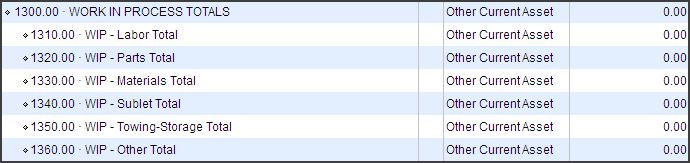
Figure 1 – Typical WIP General Ledger Accounts (Collision Repair Industry)
Notice that while your COGS accounts track granular details (sublet labor, aftermarket parts, paint materials), your WIP Asset Accounts are rolled up into consolidated category-level parent accounts. This is because we only need to group general asset values on the Balance Sheet; the ledger entries themselves will utilize your individual detailed COGS sub-accounts.
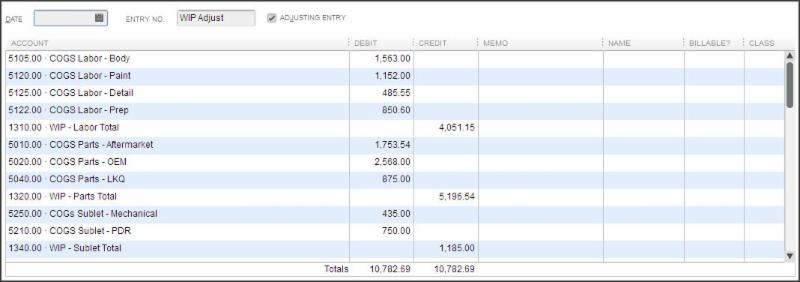
Figure 2 – Typical General Ledger Memorized WIP Adjustment Journal Entry (Collision Repair Industry)
📊 Handling Calculated Paint & Materials:
If you are utilizing an external management system, material costs are typically calculated rather than tracked via actual direct invoices. To capture these, you can apply a standard percentage based on calculated costs. For instance, if paint/material calculated WIP values are $2,030.00, you can book an estimated allocation (25% to 50%)—meaning you’ll add $507.50 to $1,015.00 to your WIP – Materials Account and reduce COGS paint materials by the same amount.
Reversing Entries vs. WIP Change
Once your monthly entry is posted on the final day of the accounting cycle, there are two distinct methods you can use to process and manage these accounts moving forward:
Method 1: Reversing Entries (Easiest)
The reversing entry is made on the first day of the following month. This is the most common path used by bookkeepers. It fully transfers all asset values back out of the WIP asset accounts and returns them to zero, restoring the original balances to your COGS lines.
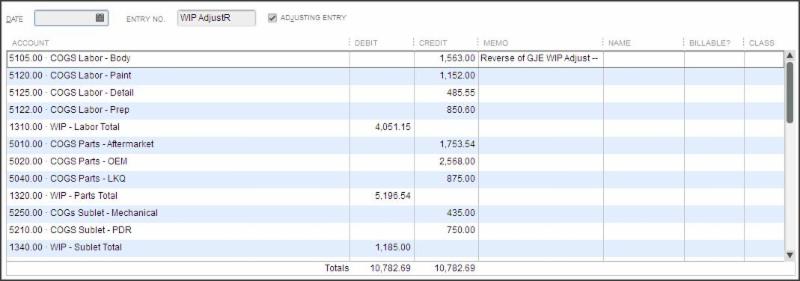
Figure 3 – Typical General Ledger Memorized WIP Adjustment Journal Entry Reversal
💡 QuickBooks Pro-Tip:
When viewing your original WIP Journal Entry, click the “Reverse” button on the toolbar inside the Main tab. QuickBooks will automatically clone the transaction, invert debits and credits, and let you date it on the 1st of the following month with a single click.
Downside: If you check current-month profitability mid-month before posting the next WIP entry, your margins will look artificially depressed because the previous month’s reversed costs are sitting in COGS without the corresponding sales yet.
Method 2: Entering Only the Net WIP Change (Most Accurate)
Instead of completely wiping the asset balances to zero at the start of the month, you simply adjust the ledger up or down to account for the net difference in inventory value compared to the previous month. This is the gold standard for financial accuracy but requires a tracking spreadsheet to make the calculations easy.
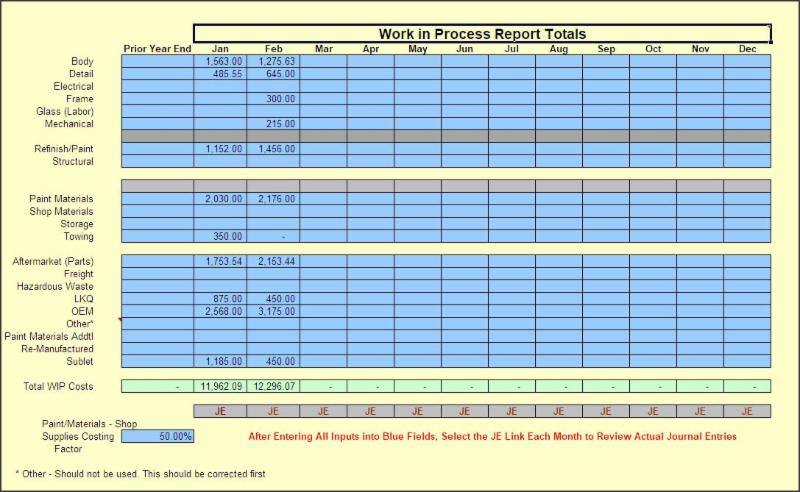
Figure 4 – WIP Change Spreadsheet (Collision Repair Industry CCCone Management System)
The spreadsheet maps directly to your management system’s reports. Once numbers are entered, it instantly calculates the required net change journal entry.
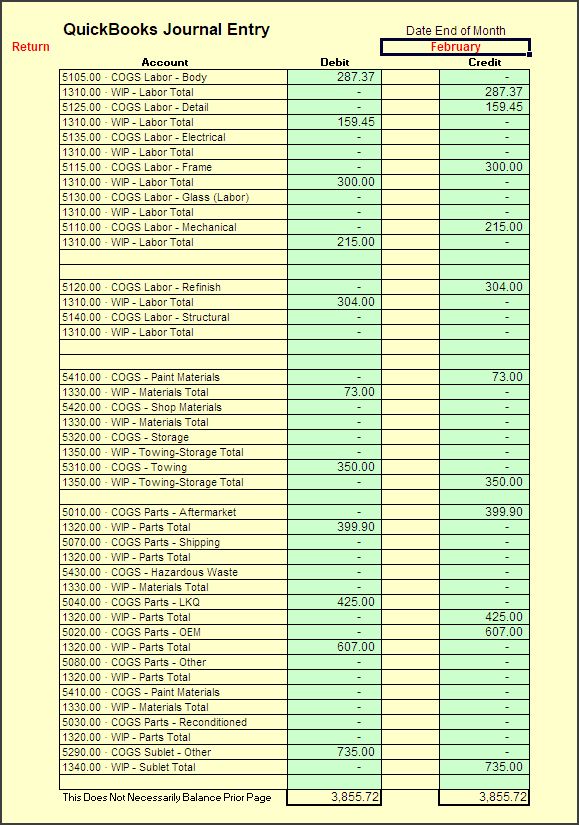
Figure 5 – WIP Change Journal Entry (Collision Repair Industry CCCone Management System)
⏰ Prepare for Year-End Clean Up Now
We are currently moving deep into our final quarter. Before you know it, tax season will be here. Have you analyzed your projected year-end profitability and structural tax liabilities yet? If not, now is the time to start.
Year-end closing requires careful ledger clean-up, account reconciliations, and structure adjustments before handing books over to your CPA. It’s also the absolute perfect window to transition or upgrade your Chart of Accounts to reflect clean operating details for the coming year.
These structural changes require planning—don’t wait until late November or December to scramble for help!
📅 Book Your Session Now
Free 1-Hour New Client Session • Limitless Growth Analysis
If you missed our earlier issues of QuickBooks Tips & Tricks, you can catch up on past topics by visiting our archive: Click Here.
Thank you, and I look forward to sharing more QuickBooks Tips and Tricks with you next month!