
 Tony Passwater
QuickBooks Loans, Capital Leases & Depreciation
Avoiding Critical Month-End Accounting Mistakes That Distort Your Financial Statements
In this month’s QuickBooks Tips & Tricks, we will discuss a very common set of bookkeeping mistakes made by business owners that severely skew their monthly financial statements.
When a financial report such as a Profit and Loss (Income Statement) is produced, it is absolutely critical that the transactions listed are valid, complete, and accurate. Otherwise, the report is of no benefit for analyzing your business or making strategic operational decisions. The same is true for your Balance Sheet—if key transactions are missing or misallocated, the report is functionally useless.
To begin, let’s review a few fundamental concepts to understand which transactions are valid, what is commonly missing, and how to correct them.
What is Income/Revenue?
In every business, you have primary products or services that you sell to customers. Revenue is earned when you complete those services or finalize the sale of products. These are categorized as regular operating revenue. Other monies you deposit into your bank that are not directly generated by these core sales are either considered Other Income or are not income at all.
⚠️ CRITICAL QUICKBOOKS PROTOCOL
In QuickBooks, you should only use the “Receive Payments” process when receiving monies for your actual customer invoices. DO NOT USE this function for receiving any other funds, including loans, partner capital, or “Other Income” rebates.
If the incoming funds are Other Income (such as interest earned on bank accounts, rebates, accounting discounts, or late payment charges), they should be entered directly onto the QuickBooks Deposit Form. Record them exactly as they will appear on your bank statements so you can easily reconcile them. They can be bundled with a regular operating deposit using Undeposited Funds.
If they were deposited electronically via EFT or ACH, create a separate deposit transaction matching the exact date and amount of the bank clearance. This keeps your monthly bank reconciliations exceptionally clean.

Figure 1 – Typical Deposit Form adding “Other Income” (Checks Received)
In the example above (Figure 1), two checks were received that are not regular operating revenue. The first line is an NSF check charge to a customer, while the second is a purchase rebate check. These are correctly distributed to the appropriate “Other Income” accounts. Monies deposited from bank loans are also not income—they must be deposited directly into the bank and distributed to the corresponding Liability Account.

Figure 2 – Typical Deposit Form for Loan Deposit (EFT From Bank)
In this second example (Figure 2), a business loan was obtained and the funds were electronically deposited into the bank. When taking out a loan, it must be set up as a Liability. Typically, this will be a Long-Term Liability unless the repayment period is `$12\text{ months}$` or less, in which case it is classified as a Current Liability.

Figure 3 – Typical Long-Term Liability Account Setup
💡 Pro-Tip: We highly suggest using the last four digits of the loan account number directly in the account name. This makes it exceptionally easy to ensure monthly payments are posted to the correct ledger, especially if you have multiple active credit lines or equipment loans. This liability account should only track the principal balance. The ledger balance should be reconciled monthly against your bank’s actual outstanding principal statement.
What are Expenses?
On the flip side of operating revenue, you have business expenses. Expenses are considered raw costs to produce or sell your products and services. Direct costs like Cost of Goods Sold (COGS) and indirect costs like rent, utilities, office payroll, and liability insurance are all regular business expenses.
Loan payments are NOT business expenses. Because the original loan principal was not recorded as “income” when received, the repayment of that principal cannot be claimed as a business expense. Only the interest portion and associated processing fees are tax-deductible expenses.
This is one of the most common errors we see in QuickBooks files. To handle this correctly, you must obtain a loan amortization schedule from your lender. Although your total monthly payment amount may remain constant, the principal portion will increase each month, while the interest portion will decrease. Each monthly payment check must be split accordingly in QuickBooks.
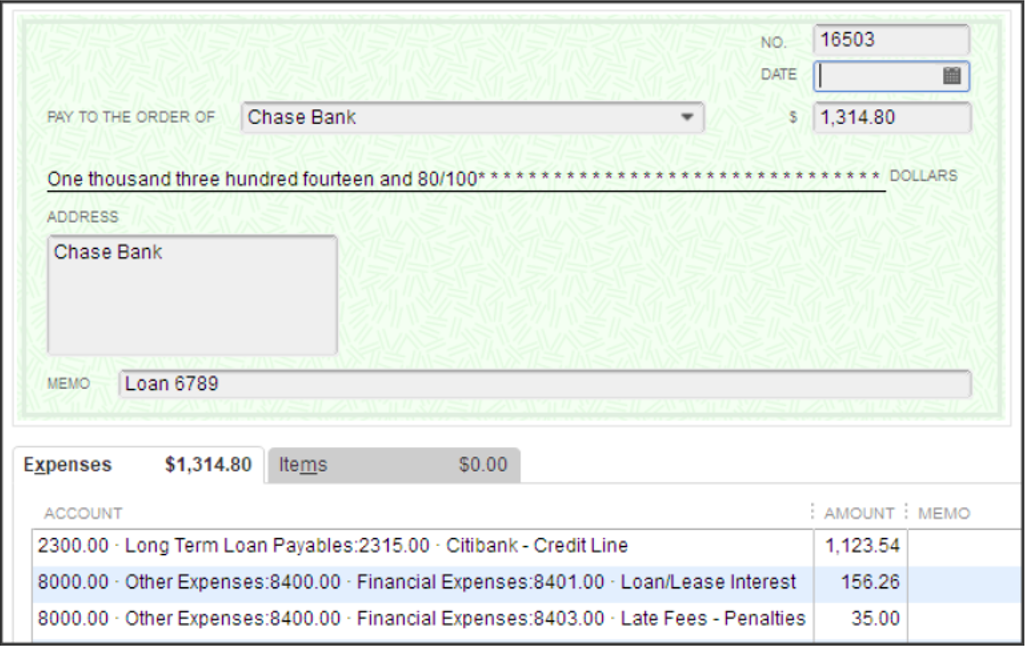
Figure 4 – Typical QuickBooks Check Entry – Loan Repayment
In the example above (Figure 4), the payment of `$\$\$1,314.80$` is split cleanly: `$\$\$1,123.54$` goes to reduce the principal balance of the loan, `$\$\$156.26$` is allocated to interest expense, and `$\$\$35.00$` is booked as a late fee expense. Reconcile this liability line item every single month.
Operating Leases vs. Capital Leases
Just because a contract is labeled a “Lease Agreement” does not mean it qualifies as an operating lease under IRS guidelines. How you treat it in QuickBooks has massive financial reporting and tax implications.
If an equipment lease has a nominal end-of-lease buyout (typically `$\$\$100.00$` or a simple `$1\text{ dollar}$` option), it is classified as a Capital Lease. A true Operating Lease allows you to deduct the full rental payment each month. Common examples of operating leases are copier rentals, temporary furniture, and closed-end vehicle leases with no ownership intent.
However, for vehicles and heavy shop equipment that you intend to own after the lease term, the IRS treats the contract as a financed purchase. You must record the asset value on your Balance Sheet, establish a corresponding liability, and depreciate the equipment over its useful life.

Figure 5 – Typical QuickBooks Capital Lease Liability Account
We recommend setting up a dedicated “Capital Leases” parent liability account to separate these agreements from standard bank loans. Remember, any sales tax paid monthly on lease invoices should be capitalized as part of the overall fixed asset cost, rather than written off as a regular operating expense.
Net Ordinary Income vs. Cash Position
In your QuickBooks Profit and Loss, “Net Ordinary Income” represents your core operating profit. While important, it completely excludes “Other Income” and “Other Expenses” that significantly affect your actual cash reserves.
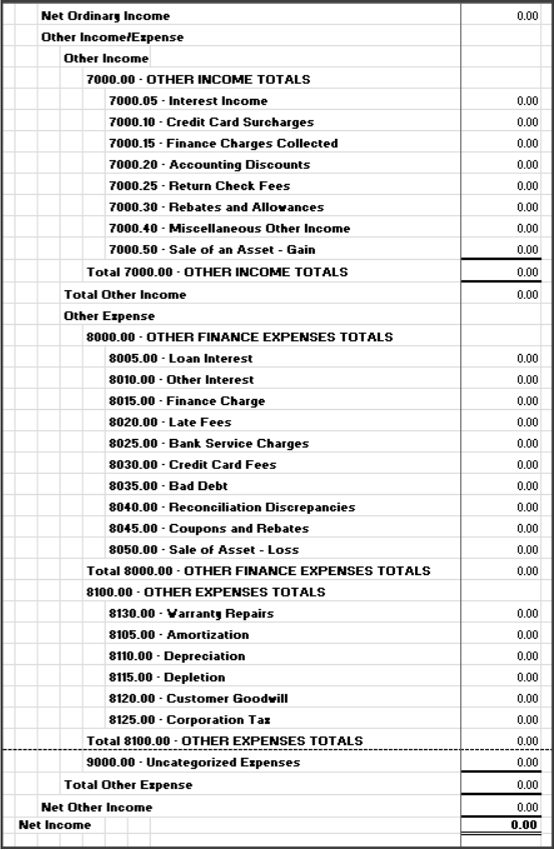
Figure 6 – Typical QuickBooks Other Income and Other Expense Accounts
Grouping non-operating items under “Other Expenses” (such as corporate income taxes, political contributions, and depreciation) keeps your core operating profit lines clean and makes monthly performance reviews much more actionable.
Net Profit Does Not Equal Cash in Bank
A fatal misconception for many small business owners is that “Net Profit” equals “Cash in the Bank.” This error in understanding financial statements frequently leads to severe operational cash shortages.
Your Profit and Loss statement does not track principal loan repayments, capital lease payouts, owner draws, or employee wage advances. All of these require hard cash outlays that drain your bank balance. A fast-growing business can easily report strong net profits on paper while running completely out of cash to fund daily operations.
To see the complete picture, you must analyze your Statement of Cash Flows alongside your Balance Sheet and Profit and Loss. This report reconciles net income back to actual cash movements, showing you exactly where your money went.
Depreciation & Amortization
Most business owners rely entirely on their CPA to book depreciation entries at year-end. This is a massive mistake for active business management. While principal payments are not expenses, the wear and tear of your capitalized assets is a real operating cost that should be recognized monthly.
For tax filings, CPAs often use accelerated schedules like Section 179 or bonus depreciation to maximize tax deductions. While excellent for reducing tax liability, dumping a massive depreciation expense into QuickBooks distorts your true monthly operating margins. To keep your reports accurate for operational reviews, we strongly recommend using Straight-Line Depreciation on your internal books.
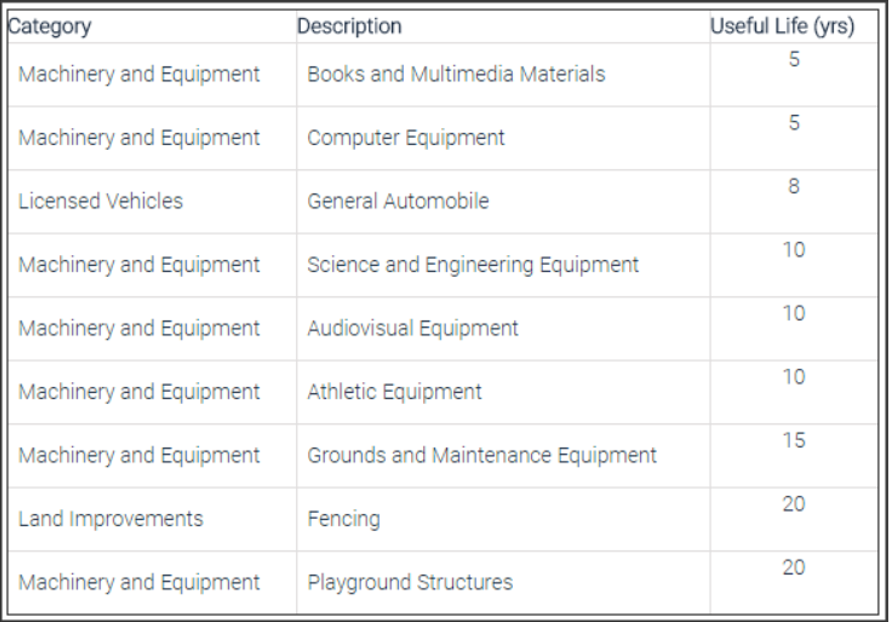
Figure 7 – General Chart for Useful Life to Determine Depreciation Length
Under IRS straight-line rules, an asset is written down over its estimated useful life (typically `$5\text{ years}$` for vehicles and IT hardware, up to `$39\text{ years}$` for commercial real estate). To calculate your monthly expense, subtract the estimated salvage value from the asset’s purchase price to determine its “basis,” then divide by the total useful life in months.
📐 Practical Straight-Line Calculation:
Consider a machine purchased for `$\$\$40,000.00$` with an estimated end-of-life salvage value of `$\$\$5,500.00$`:
$$\text{Depreciation Basis} = \$40,000.00 – \$5,500.00 = \$34,500.00$$
If the asset’s useful life is `$5\text{ years}$` (`$60\text{ months}$`), we divide the basis by the term:
$$\text{Monthly Depreciation} = \frac{\$34,500.00}{60\text{ months}} = \$575.00\text{ per month}$$
You should set up an automatic, monthly memorized journal entry for `$\$\$575.00$` to recognize this operational cost consistently.
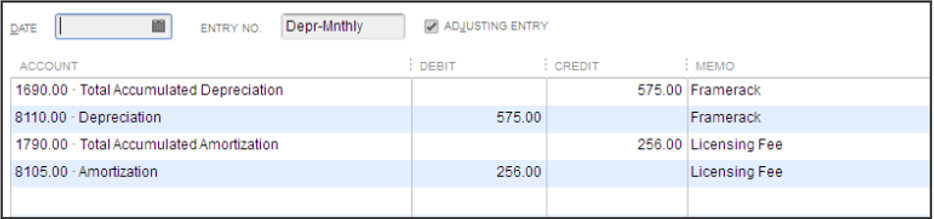
Figure 8 – Typical Memorized Journal Entry – Depreciation and Amortization
To clarify terms: Depreciation is applied to physical assets (machinery, computers, building structures), while Amortization is applied to intangible assets (purchased software, customer lists, corporate Goodwill, trademarks). Both are calculated using the same basic straight-line logic, but must be listed separately on your corporate financial reports.
Next month: preparing and cleaning up your books for year-end!
If you have missed our earlier issues of QuickBooks Tips & Tricks, you can catch up on past issues by Clicking Here.
Thank you, and I look forward to sharing more QuickBooks Tips and Tricks with you next month!