
 Tony Passwater
QuickBooks Accruals & Inventory Strategy
Understanding the True Cost Allocation Behind Your Monthly Financials
In our previous guide, we analyzed two very common improper postings that cause your P&L to fluctuate wildly each month, and how to fix them. While those are highly frequent, the dollar amounts they affect are typically much smaller than the two key areas we are focusing on this month.
We cannot overemphasize the vital importance of “Closing Your Books” properly each month. Skipping this systematic process regularly wreaks havoc on the accuracy of your financial statements, leaving you with unreliable data for critical business decisions.
To manage a stable business, you must analyze your performance on an Accrual Basis. Accrual accounting matches expenses to the exact month they were incurred, regardless of when the cash actually left your bank account. Creating structured “Bills” inside the correct month is the foundation of this process.
This Month’s Focuses:
Other Accruals
Inventory Adjustments (And the costly impact of ignoring them month-end)
Other Accruals
Failing to account for accrued expenses causes sharp, artificial spikes on your ledger. Accruals are business costs that function similarly to pre-payments, but in reverse—you incur the expense steadily over time before you make the physical payout.
Expenses That Should Be Accrued Regularly:
Vacation Pay
Sick Days & Paid Time Off (PTO)
Holidays
Year-End & Quarterly Bonuses
IRA Employer Contributions
401K Employer Match Contributions
Take year-end bonuses as a clear example. Was that bonus earned only in December? Or does it represent services performed throughout the entire fiscal year? When posted improperly as a lump sum in December, it decimates that month’s profitability. Instead, that cost should be accrued and spread evenly over the entire 12-month period.
At the beginning of each year, determine your annual budget for these recurring expenses and divide it by 12. Then, set up a memorized monthly Journal Entry or a Zero-Dollar Check to book the pro-rated amount to your Accrual Liability Account and cost it to the corresponding Expense Account.

Figure 1 – Memorized Accrual Entry Example
When the actual physical payout is made, the transaction is coded directly against the Accrual Liability Account, not the expense account. This keeps your monthly margins perfectly flat and predictable, avoiding a massive balance sheet hit all at once.

Figure 2 – Charging Payments to the Accrual Account
This accrual method should be used for month-end and quarterly performance bonuses, so your operational reports remain completely accurate before the month is closed.
Inventory Adjustment
Most service-oriented businesses carry substantial on-hand stock to expedite production. In our industry, ignoring monthly inventory fluctuations is the absolute leading cause of artificial profit and loss roller coasters.
It is highly intelligent to purchase fast-moving parts or supplies in bulk to secure volume discounts. However, the raw cost of those bulk purchases must not hit your Profit and Loss statement all in a single month.
💡 The Golden Consumption Rule
It is incorrect to “cost out” materials purchased for your business until they are actually consumed in production. Just because you purchased and paid for bulk items does not mean they are a current-month operating expense. You must only record the cost of the portion fully consumed during that specific month.
While QuickBooks Desktop features basic built-in inventory tracking, and QuickBooks Enterprise offers an advanced module, standard system inventory setups are often too rigid for fast-moving service businesses.
Deploying a tailored third-party inventory system designed for your industry is a massive game-changer. These modern systems connect with your primary vendors and offer advanced features like barcode scanning, digital job-cost allocation, and automated pricing updates.
What Counts as Active Inventory?
Office & Administrative Supplies
Bulk Boxes of Copier Paper
Laser Toner & Inkjet Cartridges
Blank Security Check Stock & Stationery
Janitorial & Building Maintenance Stock
Shop & Operational Materials
Antifreeze, Bulk Oils, and Filters
Replacement Tires, Bulbs, and Fuses
Nuts, Bolts, Clips, and Fastener Assortments
Refinish Paints, Clears, and Toners
Depending on your specific operation, you should track these asset categories inside distinct General Ledger (GL) Accounts. Your cost accounts must map back to Cost of Goods Sold (COGS) sub-accounts to isolate parts, sublet, materials, and shop supplies.
Month-End Inventory Adjustments
Structuring separate asset sub-accounts for your different inventory types is highly recommended. This ensures that monthly value adjustments flow cleanly to their corresponding COGS lines, keeping your department margins accurate.
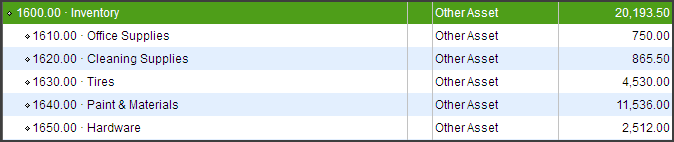
Figure 3 – Typical Inventory Accounts Breakdown
You can utilize two distinct methods to process and track your inventory adjustments each month. Whichever method you choose, you must perform a physical inventory count at least quarterly to verify system integrity and prevent undetected shrinkage or theft.
Method 1: Adjusting by Inventory Value Change
During the active month, all incoming vendor invoices (Bills) are coded and distributed directly to their standard COGS or expense lines. At month-end, you calculate the net change in inventory value and post a adjusting Journal Entry to shift the difference between your Balance Sheet and your P&L.

Figure 4 – Inventory Adjustment Journal Entry (Method 1)

Figure 5 – Asset Account Adjustments (Method 1)
Method 2: Accumulating Purchases in Inventory Assets First
Under this system, every single vendor invoice (Bill) for stocked materials purchased during the month is coded directly to an Inventory Asset Account on the Balance Sheet. At month-end, you calculate your true consumed usage and transfer that cost into COGS.
📐 How to Determine Your True Monthly Cost:
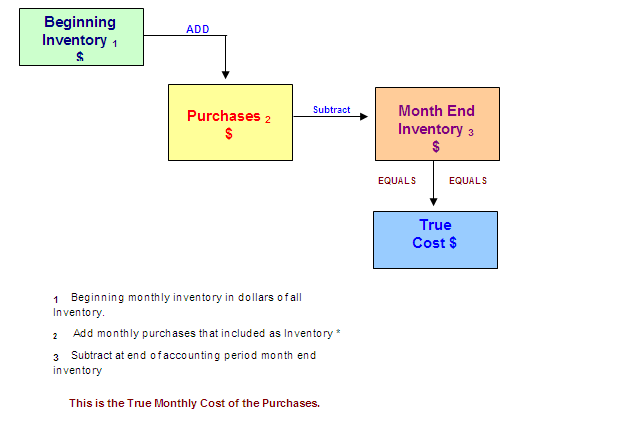
Practical Example:
Your tire inventory asset balance at the beginning of the month was $17,500.00. During the month, your total tire purchases were $10,000.00. Your ending physical inventory value is evaluated at $16,500.00.
True Cost Month End Tire COGS = $17,500.00 + $10,000.00 – $16,500.00 = $11,000.00

Figure 7 – Entering the True Cost Adjustment (Method 2)
Tracking and adjusting your inventory values at the end of each month is the absolute key to maintaining clean, predictable financials. After reviewing hundreds of small business files globally, we have found this to be the second leading cause of erratic monthly profit and loss shifts. Isn’t it time to begin managing your Inventory?
In next month’s guide, we will conclude our series by focusing on the single largest driver of P&L fluctuations: Work in Process (WIP) accounting.
Planning for Year End
We have just completed our Labor Day Holiday, and we are going to finish up the third calendar quarter before you know it. This is the time to begin planning for year-end and the new fiscal year—not in November or December.
Is your company file getting too large? Are you getting close to the limits we have discussed in previous issues? This is the time to assess the situation and make plans. Waiting until your company file crashes can cost you a lot of frustration and extra money.
Are you thinking about upgrading your Chart of Accounts to reflect better details for your financials? If so, the best transition window is at year-end. To schedule this type of project, it needs to be set up now.
Closing your QuickBooks at the end of the year needs to be a high priority. Doing the year-end closing normally requires a great deal of “Clean Up” to correct accounts and verify them for a successful new year start before handing them over to your CPA for tax preparation.
💬 Tell Us What You Think!
We are constantly refining our content to better serve Collision Repair shops and small businesses worldwide. Please take 2 minutes to fill out our quick survey and tell us what topics you would like to see us cover in the future!

Need Help Reconciling or Setting Up Your Systems?
Our company AEII, QuickBooks R Us, is here to assist small businesses with clean-up services, training, and custom setup options. Let us help you align your systems so you can make informed decisions.
📅 Book Your Session Now
Free 30-Min Consultation • No Obligation
If you have missed our earlier issues of QuickBooks Tips & Tricks, you can catch up on past issues by Clicking Here.
Thank You, and I look forward to sharing more QuickBooks Tips and Tricks with you next month…